Control your solo fighter
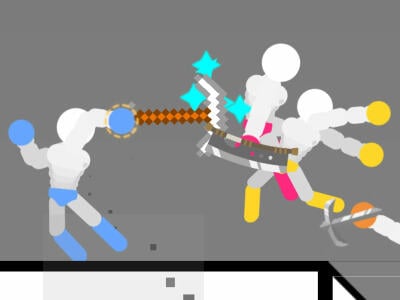
The single-player round shows the WASD keys above the blue fighter.
Use a computer with a keyboard and click inside the player first. Follow the in-game instructions for the mode you choose. Open the original game page.
Controls checked against the linked game sources.
The single-player round shows the WASD keys above the blue fighter.
Choose 1 Player, review the fighter and arena options, then click Go!
Read the key hints for each player in the two-player menu before starting the match.
Pick another browser game. Each page includes a player, controls, and links to the creator.
 POPULAR
Aim your weapon and use arena physics to outlast the other stickman.
 POPULAR
Move through timed rooms and chain hits on furniture with Space or J.
 NEW
Bounce, block, and score in a chaotic one-button basketball game with changing courts, players, and balls for solo or local two-player matches.
Ragdoll Hit Stickman is a browser fighting game built around physics. You move a stickman through an arena, collide with an opponent, and use jumps, pushes, kicks, or punches to gain an advantage. Your fighter keeps moving as limbs swing and bodies tumble, so the angle and speed of a collision can matter as much as how close you get. Gameflare lists single-player, survival, and two-player battles for this edition.
Press Play Now to open the hosted player and pick a mode in the game. Use a keyboard to play the single-player mode, which shows WASD in the match. The browser build shown here is the one Gameflare loads under the name Ragdoll Hit Stickman. If you arrive from a video or walkthrough for a different Ragdoll Hit listing, compare the mode names and key hints before following it.
Click inside the game after opening it so your keyboard controls the fighter. In 1 Player, begin with short taps of A and D to see how the character responds and how long it takes to change direction. Gameflare’s listing shows arrow keys as a general movement hint. Use the keys the game displays for the fighter and mode you are actually playing.
Practice taking a step, releasing the key, and watching the fighter settle. Then try an approach toward the opponent. Notice whether you can stop in a position that leaves room to retreat. If the keys scroll the page or do nothing, click the game area again and check whether an in-game menu needs your input. Fullscreen can give you a larger view of the arena and the edge of the platform.
Time your approach so your fighter arrives in a useful position. Rushing directly into every collision can send you off balance or leave you near a ledge. A short move toward the center gives you room to change direction after contact. If an opponent closes in near an edge, try moving back into open space before going for another shove.
Watch how the fighters react after they collide. A body that is still falling or swinging will respond differently from a fighter that has just settled. Rather than repeating the same move from every angle, change one part of the approach and compare the result. Enter from the side, or wait until the opponent lands before moving in. Use the arena itself as a guide to how much recovery space you have.
Gameflare lists single-player matches against AI and a survival mode. Start with single player if you want a round in which to get comfortable with movement and distance. Survival is a useful place to practice recovering from awkward positions because it gives you more reason to keep your fighter in a part of the arena where you can move. Check the game menu for the exact options available to you.
The two-player option is for a match against a friend. Review the mode’s control prompts before starting so each player knows which keys belong to their fighter. Plan around a shared keyboard when playing at the same computer. The source does not describe an online matchmaking mode for this build, so use the on-screen mode selector to confirm how the match starts.
The opening menu shows 1 Player, 2 Player, and Survival. Select 1 Player and the setup screen shows a blue fighter on the left and a red fighter on the right. The center preview starts with a question mark and arrows to change the arena selection. Leave the defaults in place for a quick first round, then choose Go! to enter the match. This makes it easy to get to the movement practice before experimenting with the other setup choices.
One arena in the tested build has floating grass platforms with lava below. Look for a safe platform before trying to close distance, especially when the other fighter is across a gap. The WASD prompt appears above the blue fighter at the start of the round. The round screen also shows a back arrow and sound control, which you can use when you want to leave the match or adjust the audio.
Gameflare describes a selection of arenas and unlockable characters. Let the current menu tell you which choices are available. When trying an unfamiliar arena, take a moment to identify where the open floor ends and whether your path to the other fighter is clear. A move you can recover from in the middle of a wide stage may put you in trouble when there is less space near the edge.
Use the Gameflare source link for this version and the Poki link if you are looking for the listing credited to Ericetto. Their instructions and menus should be treated separately. For another game where timing and momentum determine how a character moves, Basket Random offers a separate physics-driven competition on this site.
Yes. Use Play Now above to load the browser build used on Gameflare.
Use WASD in 1 Player. Gameflare’s listing also shows arrow keys, so follow the prompts for the fighter and mode you select.
Yes. Gameflare lists two-player battles. Check the game’s key hints for both players when you select that mode.
Yes. Gameflare lists survival alongside single-player and two-player play.
This page runs the Ragdoll Hit Stickman build loaded by Gameflare. Poki publishes a separate listing under the shorter title Ragdoll Hit.
Game information and controls checked on November 8, 2026. This is an independent game page.
The browser build on this page is the one loaded by Gameflare under the title Ragdoll Hit Stickman. The Poki listing credits Ericetto for its Ragdoll Hit edition. Artwork belongs to its respective rights holders.