Move and look
Move with WASD and use the mouse to change your view.
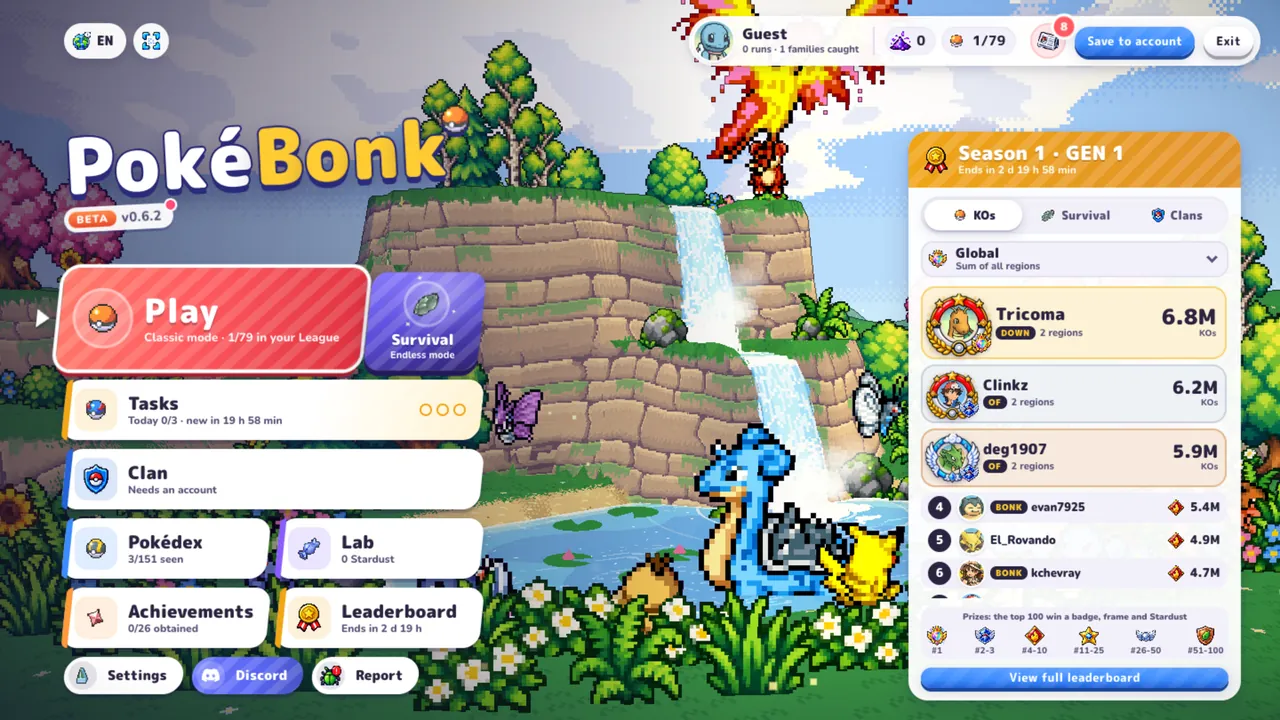
Click inside the game for keyboard controls. The provider may require human verification before guest play; guest access and saving are managed by the game. Open the original game page.
Controls checked against the linked game sources.
Move with WASD and use the mouse to change your view.
Space jumps; hold to glide when flying. Shift slides or dodges.
R activates the Ultimate. E interacts or captures when available.
Right click locks a target; Q aims. The mouse wheel adjusts zoom. Check the current game settings for changes.
Pick another browser game. Each page includes a player, controls, and links to the creator.
 NEW
NEWSteer and jump through snowy slopes, avoid hazards, and collect gift boxes to unlock sleds in this 3D endless runner.
 HOT
HOTDash through hazardous city streets, slide under barriers, leap past spikes, and evade a relentless robotic chaser in this 3D cartoon runner.
 NEW
NEWPlay workout, rest, and supplement cards to build muscle, manage fatigue, and reach competition goals in Greg Austin’s bodybuilding deckbuilder.
PokéBonk is an unofficial 3D Pokémon survivor fan game by Charcher. You choose a starter, face groups of wild Pokémon, gain experience, select upgrades, and work toward evolution and League progression. The running game’s own description identifies all 151 Kanto Pokémon and browser-based WebGL play. Pokebonk is the same name written without the accent; it does not describe a separate mode.
This page loads the pokebonk.com build that appears inside the supplied pokebonk.online player. The playable frame identifies its creator and displays its own version, while the surrounding guide may describe an older beta. Follow the live menu when a version number or feature differs. This page does not combine accounts, saves, or leaderboards from other websites using the PokéBonk name.
Select Play Now above and allow the player to load. The verified build presents a guest option alongside account entry and account creation. Choose the guest option if you want to try the game without entering account details. The game handles its own connection and progression. This website does not create a trainer profile or ask for your game password.
The login screen states that guest progress is stored on the server and associated with the device. Treat that as the provider’s save arrangement rather than a promise of recovery on a different browser. The provider may show a human-verification challenge before guest play. If a session cannot connect, use the original game link below the player. Opening the source directly can also help when browser restrictions affect third-party storage or account access.
The supplied guide lists Bulbasaur, Charmander, and Squirtle as starter choices. Their grass, fire, and water themes give the starting decision a recognizable shape, but inspect the current game’s descriptions before choosing. The guide characterizes Bulbasaur around healing, Charmander around damage, and Squirtle around defense. Those descriptions are a starting reference, not a guarantee that one starter is strongest in every beta revision.
During a run, movement keeps you away from incoming groups while experience and upgrades develop your build. The guide describes successive zones, boss encounters, and choices as you level. Learn how one upgrade affects your current partner before trying to optimize an entire run. Reading the actual upgrade text is more useful than assuming a familiar Pokémon move behaves exactly as it does in another game.
The supplied control table uses WASD for movement and mouse input for looking around. Space jumps, with holding used for gliding when flying; Shift provides a slide or dodge. Practice those movement actions before a crowded encounter. A suggested learning routine is to move in open space, turn the camera, then add jumps and dodges, so you can tell which input changes position and which changes the view.
R is the published Ultimate key, and E is used for interaction or capture. Right click locks a target, Q aims, and the wheel changes zoom. Availability depends on the situation shown by the game, so pressing a capture key is not a promise of an instant catch. Review current bindings if a command does not respond. Click inside the frame again after using page links so keyboard input returns to the game.
Keep the camera and movement roles separate while learning. Turning the view helps you see the approaching group, while moving changes the space between your partner and that group. Practice both in a quieter moment before relying on a complicated combination during an encounter.
The supplied guide distinguishes Classic progression from Survival play and describes recruitment, research, evolutions, and collection. The main game itself advertises evolution and League unlocks. These systems give runs a purpose beyond a single encounter: learn a partner, read upgrade choices, and inspect what the current menu says you can unlock next. This guide does not prescribe an unverified currency purchase order or unlock shortcut.
For a first attempt, focus on recognizing danger and using the controls deliberately. Keeping space around your character and noticing an available escape route are practical suggestions based on the described survivor mechanics. They do not guarantee a boss victory. After a run, compare the choices you made with the result and try a specific adjustment instead of changing every part of the build at once.
The guide describes touch input with a left joystick, drag-to-look, and on-screen actions, as well as controller support. Desktop mouse and keyboard bindings are listed above. Device compatibility can depend on the current build and available WebGL support. A layout that fits a phone does not prove the whole run has been tested on that phone. Use the game’s displayed controls as the final reference.
The game’s legal notice describes a free, nonprofit fan project and credits Charcher. Pokémon names and characters remain the property of their respective owners. The notice also credits PMD SpriteCollab assets under CC BY-NC 4.0. This independent guide does not claim ownership, official endorsement, or permission to redistribute those assets commercially. Links below lead to the running game and the guide used to check the controls.
Yes. The running game describes itself as a free fan game and offers guest access. Account connection is handled by the game provider.
Charcher is credited in the playable pokebonk.com build. It is an unofficial fan project.
The supplied guide lists Bulbasaur, Charmander, and Squirtle. Check the current starter screen for the build you are playing.
The guide lists R for Ultimate and E for interaction or capture. Use them when the current game makes the action available.
No account sharing is established here. This player uses pokebonk.com; do not assume another domain has the same profiles or progression.
The provider may require human verification before guest access. If the session cannot connect, try the original game page. Loading the login screen alone does not guarantee a successful session.
Game information and controls checked on October 22, 2026. This is an independent game page.
Unofficial Pokémon fan game by Charcher. Not affiliated with Nintendo, The Pokémon Company, Creatures, or GAME FREAK.
The actual frame loaded by pokebonk.online; creator, guest-save notice, fan-game credits, and current beta menu.
Supplied source for the inspected player, starter overview, control table, and progression explanations. Its beta label differs from the current running game.