Move and rotate a piece
Left and right arrows move the piece. Z or up arrow rotates it.
Click inside the player before using the keyboard. Keyboard and gamepad controls are documented; touchscreen controls are not confirmed. If the player cannot load, open the creator’s itch.io page.
Controls published by the creator.
Left and right arrows move the piece. Z or up arrow rotates it.
Down arrow: soft drop. Space: hard drop. C: hold a piece.
Turn the whole board, separately from rotating a falling piece.
Pause keys cannot be rebound. Other keyboard controls can be changed in the game’s options.
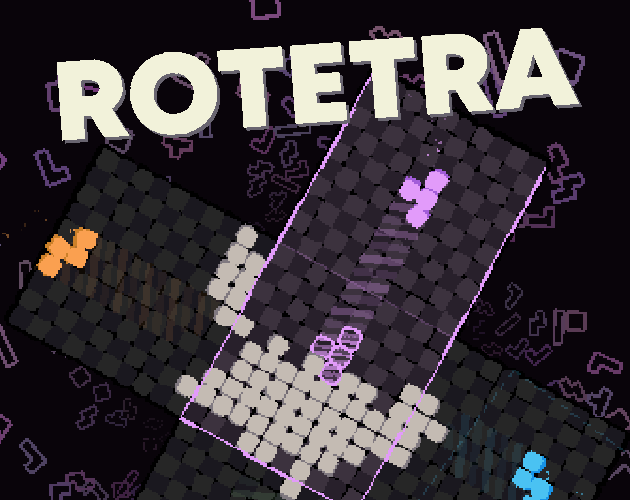
ROTETRA is a tetromino stacking puzzle by Michael Kamm, published on itch.io under the name sharkwithlasers. You move and rotate falling pieces, but you can also turn the entire board and juggle several pieces at once. The separate grid controls change how you approach the familiar task of fitting block shapes together. The creator lists the project as in development and provides an HTML5 browser demo.
This page opens that hosted demo when you press Play Now. Its title screen identifies it as a demo, so treat it as a way to try the central idea rather than a promise of every feature planned for the full game. The creator’s page links a separate desktop demo on Steam and describes a larger collection of modes for the complete release.
Select Play Now, allow the browser build to finish loading, and click inside the game so it receives keyboard input. Follow the title prompt to reach the menu, then select play. The surrounding webpage’s Play Now button opens the player; the game’s own menu starts your session. Use the fullscreen button if you want more space to watch the board.
Begin with the distinction between rotating a piece and rotating the grid. Z or the up arrow changes a piece’s orientation. A and D turn the whole board. Try these actions separately while learning the controls, then combine them as you become familiar with the layout. Watching both the blocks and the board orientation helps you keep track of what each input changes.
The left and right arrows move a piece. Down arrow performs a soft drop, while Space performs a hard drop. C is the hold command. These are the defaults published by the creator; if you have changed your bindings in options, use your own settings. Keeping the movement, rotation, drop, and hold commands in mind gives you a practical checklist before attempting a faster session.
Esc and Enter are the documented pause keys, and the creator explicitly marks pause as not rebindable. Other keyboard controls can be rebound. If a key appears to affect the webpage instead of the game, click inside the player again before continuing. The game runs inside an embedded frame, so keyboard focus matters when switching between the instructions and the puzzle.
The creator also publishes rebindable gamepad controls. D-pad left and right move the piece. The south or east face button rotates it, D-pad down soft drops, and D-pad up hard drops. Either shoulder button holds a piece. The left and right triggers rotate the grid, and the west or north face button provides an additional grid-rotation input.
Start pauses the game and, like the keyboard pause command, is listed as not rebindable. Button positions are used here because controller labels differ between devices. Keyboard and gamepad instructions are available from the source, but touchscreen controls are not confirmed. Use a computer with a keyboard for the documented browser setup; a responsive webpage alone does not establish phone gameplay support.
The official listing says the full game will feature at least eight modes. Its named examples are Standard, Cross, Classico, and Puzzle. Standard is described as evolving from one piece to four. Cross starts with four pieces at once. Classico uses opposing pieces on an overlapping grid, while Puzzle is described as a collection of handcrafted challenges exploring the mechanics.
Those descriptions belong to the creator’s full-game plans. They are not a checklist of modes guaranteed to be unlocked in this browser demo. Check the menu of the build you are playing for its available choices, and follow the official page or linked Steam listing for current release information. No full-game purchase is required to open the free browser demo shown here.
Michael Kamm is credited with creating the game. Maddie Socha is credited for sound design and implementation, with music by Ross Mayfield and Maddie Socha. The itch.io listing was published on October 6, 2026 at 16:36 UTC and shows an update on October 14 at 03:40 UTC. These are the platform listing dates, not a claimed release date for the complete Steam game.
Use the creator links below for the original browser player, current project information, and the desktop demo. This independent page provides a playable embed and instructions; the game and cover remain the work of their respective creators. If loading fails here, try the original itch.io page before changing your game settings.
Yes. The creator offers a free HTML5 demo on itch.io, embedded here. Press Play Now to load it without installing a desktop game.
Press A or D with the default keyboard bindings. Z or up arrow rotates a piece instead. On a gamepad, use the triggers or west/north face buttons to turn the grid.
Press C to hold, down arrow to soft drop, or Space to hard drop. The creator lists these as rebindable default controls.
No full-mode guarantee is given for this demo. The creator describes at least eight modes as full-game plans; check the current browser menu for what is available to play.
Touchscreen controls are not confirmed. The official instructions cover keyboard and gamepad input; use a computer and keyboard for the documented browser controls.
Michael Kamm, whose itch.io account is sharkwithlasers. Credits also name Maddie Socha for sound design and implementation, and Ross Mayfield and Maddie Socha for music.
Game information and controls checked on October 17, 2026. This is an independent game page.