Move around the room
Walk up to furniture and leave space to turn between swings.
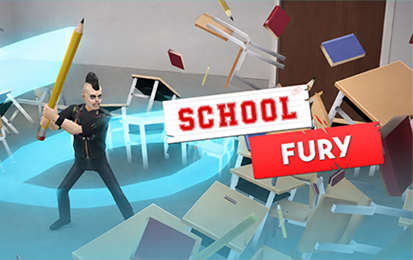
The game depicts cartoon property destruction in fictional school settings.
Click inside the game. Move with WASD or the arrow keys, then press Space or J to attack. Open the original game page.
Controls checked against the linked game sources.
Walk up to furniture and leave space to turn between swings.
Move within reach before using the attack key. Both inputs are shown in the browser build.
Keep an eye on the time and move toward nearby breakable objects.
Pick another browser game. Each page includes a player, controls, and links to the creator.
 POPULAR
Move a stickman with WASD in single player, or try two-player and survival in the Gameflare build.
 POPULAR
Aim your weapon and use arena physics to outlast the other stickman.
 NEW
Draw armor and projectiles pixel by pixel, then test penetration physics in two campaigns or an unrestricted sandbox by Matthew Zhang and roastrice.
School Fury is a browser arcade game about breaking objects in fictional school rooms. You control a character and swing at furniture or equipment while trying to score during a timed run. The 1Games listing describes classrooms, hallways, and labs and credits AZGames. Start with the room the game presents and use its prompts to see which targets and tools are available.
The opening practice area gives you a desk and chair with room to walk around them. The game displays its movement and attack keys on the screen. Use that space to see how close you need to stand for a swing and how quickly you can move between objects. The same move-and-swing pattern carries over when the rooms get more crowded.
Click Play Now above to load the 1Games player. When you see the character and the control prompt, click inside the play area so the keyboard reaches the game. Use WASD or the arrow keys to move. Space or J performs the attack in the tested build. Move to the desk or chair and press the attack key when the object is within reach.
Try the movement keys before swinging repeatedly. The camera shows the room from an angle, so movement may look diagonal across the screen. Watch where your character ends up after a short tap and approach the next object from the open side. If a key affects the page instead of the game, click the game area again and retry it.
The first objective is to smash your desk. Look for the red arrows marking the furniture beside the character. Walk up to one of those targets, face it, and try a single swing. The bat moves even if you are out of reach; flying pieces of wood are the clearer sign that you hit something. This gives you a way to judge your range before moving on to a timed room.
The publisher describes score runs with a time limit. Start with objects you can reach without crossing the room. When several targets are close together, work through them in an order that leaves a clear path to the next group. This is easier to repeat than moving from one end of the room to the other whenever an object catches your eye.
After a swing, check what is still standing. If the first hit did not reach a target, adjust your position before pressing attack again. Turning and taking one step toward the object can be more useful than repeatedly swinging from the same spot. When a path is blocked by furniture, take the route with more room to approach the next target.
The listing describes combo scoring from chained hits. Keep the next target in view while you attack the current one. A room with several objects close together gives you a chance to practice moving between them without a long pause. Check the score display as you go to see how your run is progressing, and compare the result with a second attempt at the same room.
Choose a part of your route to improve on the next run. You might start with the objects beside the door, or leave an isolated object until you have cleared the desk cluster. Changing one decision at a time makes it easier to see whether the new route saved time. If the run ends early, remember which target took more swings or movement than you expected.
The source describes coins from destruction runs and options to unlock stronger weapons, faster tools, outfits, and additional zones. Check the available choices and prices in the current game. A tool that reaches several nearby objects can favor a dense layout, while a shorter route can matter more in a room with objects spread around the edges.
Try a familiar room when you change tools. See whether your approach still puts you within reach, then check how quickly you can move from one hit to the next. The list of zones includes classrooms, corridors, and labs, so a route that works in one room may not transfer to another. Read the new layout before choosing which corner or cluster to clear first.
School Fury opens in the page and does not need a desktop installation. The controls above are the keyboard instructions shown in the browser player. On a device without a keyboard, check the current player for its own touch controls. The original listing is the place to check for changes to device support and new areas.
If you want another game based on physics and timing, try Ragdoll Hit Stickman. School Fury gives you furniture and an open room to work through, while Ragdoll Hit asks you to react to another fighter and keep your balance in an arena. Both use keyboard movement, but the goals and attack timing are different.
Yes. Press Play Now to open the hosted browser game.
Use WASD or the arrow keys. Click inside the player first if the keys move the webpage.
Press Space or J when you are near an object. Both keys are shown by the game.
Link nearby targets together so you spend less of the run walking between swings. The publisher describes combo scoring from chained hits.
Yes. The 1Games listing describes coins and tools you can unlock. Check the current menus for available items and costs.
Game information and controls checked on November 9, 2026. This is an independent game page.
The 1Games listing credits AZGames. The hosted player and cover come from 1Games.